We discuss: Graphics design, Web hacking/cheats and web design, Full blogging gists, Health and Fitness, sports and recreations, More gists and stories, News and updates, Gossips and lifestyle, entertainment and inspirations..
Six civil society groups in Myanmar claim Mark Zuckerberg distorted his company's role in stopping Facebook Messenger posts from inciting violence in the country.
Civil society groups in Myanmar are not pleased with Mark Zuckerberg.
In a Thursday letter, they slammed the Facebook CEO for a Vox Media interview in which they believe Zuckerberg glossed over Facebook's problems in the country. Zuckerberg claimed his company stopped attempts to incite violence between Myanmar's Muslim and Buddhist groups over Facebook Messenger.
"Our systems detect that that's going on. We stop those messages from going through," Zuckerberg said.
Groups in Myanmar, however, claim Facebook failed to quickly notice the problem last September, when the incident occurred. At the time, bad actors encouraged violence over Facebook Messenger with content that circulated for more than four days, possibly reaching hundreds of thousands of people.
Only when the civil society groups alerted Facebook about the abuse did the social media giant intervene, their letter says. "In your interview, you refer to your detection 'systems.' We believe your system, in this case, was us -- and we were far from systematic," the letter adds.
Although Facebook eventually stopped the abuse, by then the offending messages had caused widespread fear and at least three violent incidents, according to the groups. Making matters worse is that Facebook is ill-equipped to stop future attempts to incite violence over the platform, they add.
"As far as we know, there are no Burmese-speaking Facebook staff to whom Myanmar monitors can directly raise such cases," their letter reads. "We were lucky to have a confident English speaker who was connected enough to escalate the issue."
So far, Facebook hasn't commented on the letter. But criticism of the company's role in fanning ethnic violence in Myanmar is only growing. Last month, United Nations officials said Facebook had become a tool to spread violent messages in the country.
"Hate speech and incitement to violence on social media is rampant, particularly on Facebook," said UN human rights investigator Marzuki Darusman. "To a large extent, it goes unchecked."
Facebook is well aware of the problems and is trying to solve them, according to Zuckerberg. One company executive claims his teams are losing sleep over the issue.
The civil society groups in Myanmar say they want to work with Facebook to crack down on the abuse. But so far, they've only engaged with Facebook's policy team, and not the product or engineering divisions. Attempts at greater collaboration have also gone unanswered, they claim.
"The risk of Facebook content sparking open violence is arguably nowhere higher right now than in Myanmar," their letter adds.
The letter comes from six groups, including the IT innovation lab Phandeeyar, the Myanmar ICT for Development Organization, Burma Monitor, the Center for Social Integrity, Equality Myanmar and Myanmar Human Rights Educator Network.
A privacy policy is meant to be a contract between you and a company -- big tech companies in particular -- that ensures these companies are keeping your data safe. One company that has an enormous amount of your data -- from email and photos to videos and documents -- is Google.
The Google Privacy Policy has been "updated" 28 times since its inception in 1999 -- including three times in 2017 alone. The most was five times in the year 2015. And to its credit, Google makes all the updates and changes pretty obvious.
But this stuff can and will change to suit Google, or to suit new laws and regulations Google has to follow. For example, in the European Union and elsewhere on May 25, 2018, Google and others will have to deal with the General Data Protection Regulation, or GDPR, which completely changes how big companies can handle your, or anyone's, data. Even though it's an E.U. regulation, it impacts any company with personally identifiable info (PII) on customers there. That's definitely Google.
It'll probably help those of us in the U.S., though there isn't a law here codifying that, except in some states like New York. Until there is, there are ways to take control of what Google has on you. That means mastering the Google My Account dashboard.
Controlling your Google privacy
Google revamped its My Account page in 2015; it's meant to be a one-stop spot to take control of your privacy and security when it comes to letting this monolithic company know all about you. Rather than visiting settings for every individual Google service -- Gmail, Google Drive, Android phones, YouTube and a hundred others -- you change global settings here. Mostly.
Before you do anything, visit privacy.google.com -- it spells out exactly what data Google is collecting and what it does with that data, plus its advertising policies. Read this and you'll be a bit more informed about what settings to change. Google says it collects things you do, things you create and things that make you "you" -- namely, your personal info like name, email, birthday, gender, phone number and location.
If you want the scary version of what Google collects on you, read this Guardian article, which spells out that Google knows where you've been, what you've searched, all your apps and extensions, your YouTube history, and more. None of which should really come as a surprise.
Once you're clear on the deets, visit My Account, which takes you to a dashboard with sections for Sign-in & Security, Personal info & Privacy and Account Preferences.
You want to perform two actions right away: a Security Checkup and a Privacy Checkup.
Security Checkup
First, if you have multiple Google accounts -- like say, one for work and one you use personally -- choose the one you want to check from the menu at the upper right of the desktop screen. (Using a different avatar photo for each account can help you better distinguish between them.)
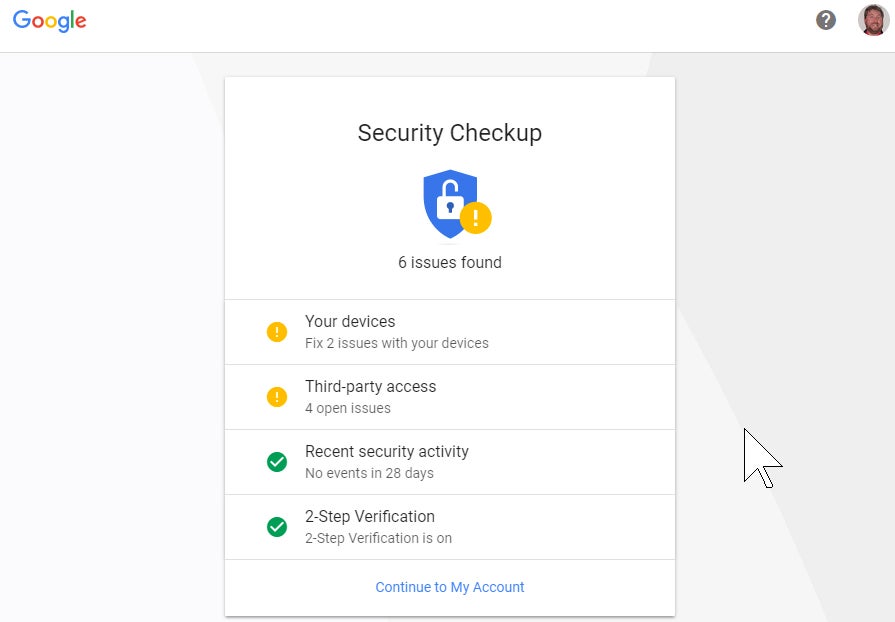
When you click Security Checkup, a pop-up will show the following info:
Your devices
Third-party access
Recent security activity
2-Step Verification (whether it's on or not).
Any items marked with a yellow warning exclamation circle should get a once over. For example, if you see devices you no longer use listed under Your Devices, nix them. Third-party access will list apps and services that have access to your Google data -- some of which could be problematic.
If you haven't already activated 2-step verification, read this and skip down to the section specific to Google. With two-factor authentication (2FA) on, you can't sign into your Google account with a password alone; you'll need a secondary method of authentication. It adds an extra step, but if someone steals your password, it's not enough to sign into your account.
To authenticate, you can use a code that's sent via voice or text message or displayed inside an authenticator app. Or you can select the Google "prompt" feature, which displays a notification on your phone asking if you're trying to sign into your Google account. If you are, just tap yes.
If you do have it on, this is a good place to set up extras like entering backup phone numbers or killing options you no longer use. You can also get backup keys for those times when you can't use the phone, or set up a hardware security key. And best of all, scroll down to Devices you trust and revoke all if you want to force a full 2FA login on all future devices.
Next, go back to My Account and under Sign-in & security page, click "Signing into Google," where you can change your password. Google will tell you how long it's been since you last changed it. If it's been over a year, consider yourself thoroughly disgraced in the eyes of the tech gods.
If you've created any App passwords -- unique passwords for specific services that don't use traditional Gmail logins, like on game consoles -- revoke them as needed. This is also where you come to generate new app passwords, but with most modern hardware, they're a thing of the past.
Then, make sure you have filled in the Account recovery options with a recovery email and phone number not necessarily related to Google.
Further down the page, check Apps with access to your account -- it's a review of the apps, websites and devices connected via your Google account. It could be something as obscure as a Google Chrome extension that works with Gmail that you don't remember installing. Remove any you know you're not using anymore. If you get rid of something you need, you can always give it permission again later.
Next, check the list of saved passwords, which is saved via Google Smart Lock, a feature of the Android OS and the Google Chrome browser that stores passwords for just about everything. It makes it very, very convenient for logging into services and sites, but can also be a security nightmare.
Delete any sites you don't recognize and get rid of any duplicates. Click the eye icon if you're not sure which dupe to delete -- it'll show the password you used for each save; delete the old, out-of-date password entries. If you've been surfing long enough with Chrome, you'll see sites you don't even recall, and that probably no longer exist.
Here, you can turn Smart Lock off so you're never asked if you want to store passwords. You can also turn off the Auto sign-in option; this stores passwords still requires you to enter them, which seems pretty dumb.
At the bottom, the list displays sites you've told Google to never save passwords for -- delete them if you want to store a password for the site in the future.
(Prepare for frustration -- the more time you spend on the Saved Passwords page, the more often you'll be asked to re-enter your Google password. But it's for security, so don't get too upset.)
Privacy Checkup
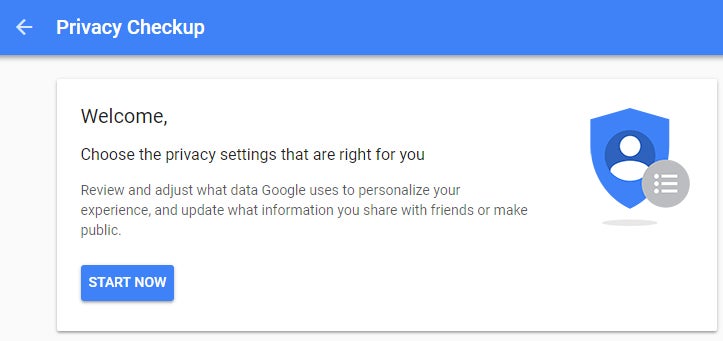
Now skip back to the My Account page to get into the Privacy Checkup, a multi-step process that lets you review how Google uses your data.
Step one lets you manage what you share on YouTube; the videos you like and save, the channels to which you subscribe, and what shows up on your YouTube activity feed. You can also use this page to limit what happens on connected accounts like Twitter, and manage the privacy of videos you upload (public, private, or unlisted).
Google Photos privacy is next. The options are limited to turning off the ability for better face matching, and the far more important option: removing geo-location on items shared by a link. That means if you share a photo of yourself, a stalker type can't look at the metadata on the image and pinpoint your location. Not that it only applies to content shared via a link. (Here's how to turn off all Google Location History.)
The Help People Connect with you option is about hiding your registered phone numbers on Google, so they can't be used by others to find you for things like a video chat. If you have a Google Voice account, it will also appear here. Uncheck all the boxes to make them private.
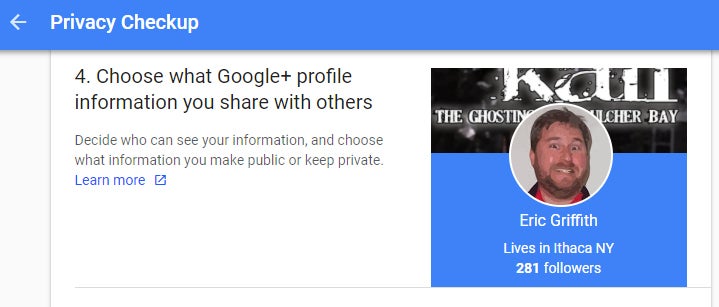
Google+? That's still around? Indeed, the remnants of this so-called social network permeate much of Google's infrastructure, enough so that you still have option here to prevent sharing photos, videos, your "+1"s (the equivalent of a Facebook "Like") and reviews you've written. Be sure to check the link for "Edit Your Shared Endorsement Settings" if you don't want your reviews of products/services on Google going out to the general populace.
The Personalize your Google experience section is the beginning of the nitty-gritty of preventing your data and Google usage from being used -- even though Google says this data is only used to help your future activities. It's essentially how Google learns about you and makes things easier in the future as you use its products, like how Google Maps or Google Assistant seem to know what you want before you even ask.
A checkmark appears next to all the items where data is being collected. Click the down arrow to the right and you can toggle off the options. Each section includes a link that reads "Manage Activity" with different options for each. Under Location History > Manage Activity, for example, you'll see what's called the Google Maps Timeline: a map displaying locations where you also logged into Google. Mine showed trips to Florida from years past, my time in the Mediterranean last year, and of course all stops around my home state. There's even route info if you used Google Maps to get somewhere. Limit it all if you don't think it's helping you. Or if you think Google is selling it to others, despite their claims.
Consider limiting your location services so Google (and Apple, Microsoft, Facebook etc.) stop tracking your physical presence via your phones.
Remember, Google makes the majority of its billions by showing you ads in search results and on Gmail, YouTube and Google Maps (plus elsewhere across the internet). You're not going to turn them off here -- for that, you need an ad-blocker program like Adblock Plus -- all you can do here is limit how much you are targeted. Of course, this section is last, because Google hopes you give up before arriving here, since having all this info to create targeted ads helps Google and its customers sell you stuff.
You can click the Manage Your Ad Settings link to see the list of topics you (supposedly) like. Click the icon next to any topics that you don't like. Or hit the toggle up top to turn off any personalization, though Google will pop up a warning of why it will make ads you see "less useful." You can set your gender (which you can customize!) and age. Click Visit AdChoices and you'll get options to opt out of personalized Google Ads on non-Google sites.
My Activity
If you're interested in seeing all your activity in one place, not just separated by service, you can check it all at myactivity.google.com, which shows you everything you've done that's remotely Google-related. The amount of data is pretty staggering.
Want to delete a day's or date range's worth of data? Want to erase all your data by Google product (so you lose YouTube activity, for example, but nothing else)? You can even pick a keyword to search and delete the related activity. Do all of it by clicking Delete activity by in the left navigation.
Takeout your data
Wondering exactly what Google has on you in all ways? Download all the data and check it out via Google Takeout. To be clear -- this doesn't remove any data from Google servers. It just shows you what Google has stored. Even if you delete your account, it's unlikely it gets deleted entirely.
Maybe someday there will be more stringent laws in the U.S. that force Google to allow that -- like the GDPR in the EU -- but for now, go to takeout.google.com. You'll see the giant list of products Alphabet (Google's parent company) offers, and of which you are probably a customer.
Untoggle any that you don't care about, and click Next at the bottom of the page. You'll be offered an archive file in ZIP or TGZ format; you can set a max size for the archive, up to 50GB. If you have more than that stored in Google, you'll have to download multiple files. You have the option to get a link emailed to you, or to have the files sent directly to Google Drive, Dropbox or Microsoft OneDrive.
I created a Takeout archive of 30 Google products on my work account since I've been using it the shortest amount of time, at around 4:13 p.m. The warning told me it could take a long time -- "hours or possibly days" to create. The email arrived almost exactly 12 hours later at 4:12 a.m. Size: 7.38GB.
Most of it was an archive of Gmail messages, which is not something you can use instantly. That's because the email archive comes in one big MBOX format file. The easiest way to access all those old messages is to get a free desktop email client with native MBOX support, like Mozilla Thunderbird, available for Windows, Mac or Linux in almost any language.
Google Drive documents were, however, instantly usable -- they all come converted into their Microsoft Office format equivalents. (Doing a Takeout of this data is a must if you're leaving a company that uses G Suite.)
What I had was mostly messages; now imagine you've uploaded or created years' worth of YouTube videos, Google+ and Hangouts chats, documents in Drive, images on Google Photos and more. It gets big, fast. And all of that data is on servers to help Google make a perfect profile of you.
Facebook offers a similar data dump that is also useful, if not outright surprising, in gauging what it has on you.
Other tips for privacy
Remember, almost every browser has a privacy mode -- Google Chrome calls it Incognito -- where you can surf without cookies or anything else tracking you. Even the mobile browsers on smarpthones support it.
You can always just delete your entire Google account and walk away. But that's a bit drastic, especially since there are literally hundreds of sites and services that use your Google credentials for logins.
Whatever your feelings about privacy, it behooves you to take a glance through the settings above. You're bound to find something Google's doing that doesn't sit right. Be thankful it gives us as much control over the privacy as it does (or maybe thank the regulators that force Google's hand). It's still not enough for the truly security/privacy obsessed, but it helps with a balance of feeling good while getting the most out of the otherwise excellent services the company tends to offer.
Most internet marketers start out selling other peoples products. This ‘affiliate marketing’ model simplifies the process and shortens the time needed to start making money online.
At some point, many marketers consider creating their own product (such as an eBook) so they can keep 100% of the profits generated by their own sales and a portion of the profits generated by their own affiliates. Most, however aren’t good enough writers or lack the funds necessary to hire a ghost-writer to complete it for them. That’s where PLR comes in.
Private Label Rights
In digital marketing, private label rights is a license that the author of an eBook or course sells to others providing most or all of the intellectual property rights to their work; including resell rights.
The PLR license is not limited to just eBooks Other formats include:
Articles
Software
Courses
Graphic templates or images
Email newsletters
Sales tools and copywriting to help you sell it
PLR eBook Advantages
The advantages of buying Private Label Rights eBook content compared to creating your own are:
Saving time not having to research the topic and write it yourself
Having professional quality content that your customers will be happy with and less likely to refund
Saving money compared to hiring a ghost-writer or buying exclusive rights to an eBook. Most PLR eBooks are very inexpensive
Gaining a reputation as an “expert” on a subject even if you know little to nothing about it
Example Of A Great PLR eBook For Marketers:
The just-released (April 2018) Power Of Execution is a with PLR (Private Label Rights) eBook and course that you can resell and keep 100% of the profits.
The Power Of Execution course focuses on the “Goals Are Meaningless Without Action” mantra. This mindset is the latest success blueprint for highly-motivated individuals on how to execute effective strategies by taking massive action to boost your overall productivity and success in every area of your life.
For your customers, this is the go-to self-help guide to help them exceed their goals, boost their productivity levels and help them unlock their fullest potential to achive far greater success.
The beauty of the Power Of Execution PLR package is that it comes with EVERYTHING you need to sell and profit from this course including:
Module 1: Premium Power Of Execution Guide which is a monstrous 10,000+ words
Module 2: Complete marketing checklist
Module 3: A comprehensive mind map
Module 4: High converting professional sales page and thank you page
Module 5: A powerful video sales letter (VSL)
Module 6: “How To Quiet Your Brain And Take Action” special report which is 4,000+ words
Module 7: Professional landing page
Module 8: Professionally written follow-up email series
Module 9: Stunning professional-quality graphics
Module 10: License certificates to keep it all legal
All of these modules make this a complete business-in-a-box product that is all done for you.
What’s Included In The PLR Course Itself?
How to turn any of your too-good-to-be-true dreams into reality by implementing a foolproof strategy
How to hire the right people that will help you move closer to your goals so that you can focus on the bigger picture and end-game
Why 92% of people working towards a goal never get there… and how you can be in the minority group who does
Why goals like “lose some weight” and “earn more money” will NEVER work. And what will
How to work towards your goals like a machine… without losing motivation or energy by relying on painful ‘discipline’
How to finally kill the fear of failure so that you can live as a winner forever
Why failure is really just a learning experience and how to use it as success fuel
The price for all of this is around the cost of two premium coffee drinks and if that’s not enough it also includes mygenerous bonus package listed below.
Disclosure: The operator of this website is a 3rd party marketer with a material connection to product/service providers appearing on this site in that we are compensated for sales made through our affiliate links.
If you have any questions please contact me (Bill) at beachroulette@gmail.com.
New technologies may provide a chance to rethink your business and improve it in ways not yet imagined.
4 min read
Opinions expressed by Entrepreneur contributors are their own.
To business owners, "creative destruction" is more than an ivory tower economic concept. It's a daily reality. Think of the well-established and long-standing taxicab business. If a smartphone app requiring comparatively little in capital investment can send that industry into disarray, then few businesses are safe from change.
In fact, in this age of proliferating technology, industry-disrupting change has become almost normal. Yet, these technologies present not only a threat but also an opportunity. Applying them to your company is likely to generate a positive impact on your bottom line.
New technologies can also provide you with a chance to rethink your business and improve it in ways you might not have imagined. Take virtual reality.
A number of companies have begun using the new technology as a tool for training employees. The MIT Technology Review recently reported that Walmart used VR to help workers prepare for Black Friday -- simulations simply can't convey what it's like to be in the midst of that shopping crush -- as well as teach more mundane lessons in customer service or how to stack produce.
Even surgeons and firefighters are acquiring new skills through the integration of VR devices. This is true as well at Farmers, where we now use VR technology to train our claims adjusters. In the past, we would build highly realistic sets at our main campus to teach adjusters how to estimate the costs of different types of damage. But, of course, we could never cover every possible situation.
Virtual reality has helped with that problem. With VR, we are now able to simulate many novel scenarios, making our training more robust. VR also helps those new to the workforce pick up concepts more quickly, as it leverages a learning platform built upon technology they're already using in social and entertainment settings.
The development and implementation of a VR system can lead companies of any size to look at their procedures with fresh eyes. And its use can have unexpected effects that extend well beyond the training of new employees.
Here are three surprising impacts that may inform your efforts to optimize your business processes when integrating VR technology.
1.VR can encourage companies to review the basics.
Transferring your business practices to a VR platform can help you discover gaps in your curriculum that you might not have otherwise found. This can give you the opportunity to improve your training, adding value to the employee experience and strengthening customer service. For example, having to explain claims adjusting to VR consultants who had no knowledge of it required us to translate our training into the most basic terms -- and this helped us see some missing elements.
In many companies, employee training is often shaped by a small group of in-house experts. But, the point of VR should be to offer a more robust training experience, and for that, you may need to do some process mapping. In our case, we had to bring in field experts to provide a full range of new scenarios to build into the curriculum. You may find that you need to incorporate outside expertise, diverse perspectives and the latest industry developments to your training. In turn, this enhanced understanding can boost your company's core competencies and add to your marketplace value.
3.It can also present new challenges.
VR can deliver efficiencies and improve the training process, but you may find that you lose something when you shift to a virtual environment. For example, when new adjusters from around the country used to come to our home office, they had the opportunity to absorb our corporate values and culture. Now, with training occurring virtually in our field offices, that assimilation process doesn't occur in the same way. You may need to be on the lookout for similar side effects and create, as we did, alternate ways to pass on your company's irreplaceable human-to-human lessons.
The financial and operational benefits of emerging technologies usually get shouted from the rooftops. But, we don't always hear about the secondary benefits that emerge when they enter specific businesses. A new technology like VR may provide you with unexpected opportunities to improve your business processes and make them more efficient. "This is the age of miracle and wonder," as Paul Simon put it, and more disruptive technologies will only continue to arrive. Better to make the most of them.
This week’s roundup, includes tips to increase revenue using Social Media, maintain a good Online Reputation, and create an effective Content Marketing strategy.
Learn how to Convert more leads to sales, and improve the performance of your Email Marketing campaigns. We’ve covered all of this news and, much more, below!
From the UpCity Blog:
Content Marketing:
Learn how to use non obvious thinking to create better Content, from Kim Moutsos’s blog.
Khushi Srivastava highlights the importance of having a Content Marketing strategy to improve the sales of your business.
Follow the valuable tips from Tania Brooks to create an effective Content Marketing strategy.
Sharon Hurley Hall offers guidance to use keywords in your Content, for increasing traffic, leads and sales of your business.
Conversion Optimization:
Shawn Herring emphasizes the need to improve page speeds, target the right keywords and perform A/B testing on the pages, for improving your website Conversion rate.
Safwan Khan discusses how strategies such as stating the benefits of your product, including social media follower counts and giving a clear value proposition can increase Conversion rate.
Olivia Walls offers actionable tips to help marketers Convert more leads to sales.
CRM:
Jaime Nacach offers guidance to employ the best practices in CRM for improving client on boarding.
Email Marketing:
Matthew Ruddle offers helpful tips to improve the open rates, click through rates and conversions of your Email Marketing campaigns.
Neil Dagger draws special attention to commonly made Email Marketing mistakes and offers guidance for marketers to avoid mistakes.
Jess Pantalleresco discusses the scenario of Email Marketing metrics to help marketers create successful data driven Email Marketing campaigns.
Mobile Optimization:
Megan Totka draws special attention to the expected Mobile Marketing trends in 2018 along with the key components, from Megan Totka’s blog.
Patricio Robles highlights the functionality of Google’s Mobile first indexing, to help marketers prepare for this roll out.
Reputation Management:
Jenii Lowe discusses how strategies such as keeping information accurate and creating processes to encourage reviews, can help businesses maintain a good Online Reputation.
Search Engine Optimization:
Jobin John lists the On-Page techniques to help webmasters with their SEO efforts.
John Vargo provides useful tips and highlights important techniques to help the beginners in SEO.
Andrew Lowen highlights what web 3.0 means for SEO and lists the web 3.0 friendly SEO practices, to help marketers prepare for the web of tomorrow.
Going Clear’s blog discusses how the tactics used for securing top rankings in SERPs have evolved over the years.
Learn how the increase in length of meta descriptions can impact your SEO strategy, from Jim Bader’s blog.
Social Optimization:
Disha Dinesh offers succinct tips to increase revenue using Social Media.
Learn how Social Media can help marketers to improve rankings in Google, increase conversion rate, create brand awareness and drive more traffic for websites, from Josiah Bussing’s blog.
Amanda MacArthur provides guidance to create a Social Media Optimization strategy.
UX/UI:
Abdul Suleiman highlights the significance of UX Design in influencing visitors’ decisions.
Amy Smith offers valuable UX and UI Design tips for beginners to learn and practice.
Website Design:
Steven Douglas draws special attention to the features of a local website in terms of design and usability.
Programming code is highly skilled work, but it doesn’t require a lot of equipment and can be done from pretty much anywhere. Coding is detail-oriented and meticulous work.
If you don't have a knack for writing computer language for software, apps and/or websites, there is an abundance of free learning resources online, such as Code Academy (which offers classes in 12 coding languages, including JavaScript and Python, as well as markup languages HTML and CSS) and Udemy, where the classes aren’t free, but extremely affordable. Classes at General Assembly tend to run pricier, and the coding school offers one-shot classes and intensive six- to 12-week training sessions online and in-class for a cost ranging from $140 to $3,500.
Coding is a general term. There are many different coding languages you can learn. For instance, JavaScript and HTML are common programming languages used for website development. The upside of programming from home is that you can set your own hours, and the mean hourly wage for programmers in the U.S. is $38.39. The median annual pay for a programmer is $79,840.
One direction you can go is specializing in front-end development, or coding the part of a website that you can see and interact with, including fonts, drop-down menus, buttons and contact forms. This requires fluency in HTML, CSS and JavaScript, plus coders should know front-end frameworks such as AngularJS and ReactJC. Or try back-end development, basically everything you can’t see on a website. Java, Scala and Python are the primary languages of back-end development.
If you’re at a loss of where to start, you can try coding languages that have staying power and are used in many applications. For instance, JavaScript is used in almost everything built on the web, including websites and video games. Every website uses HTML as a markup language, which controls how the website appears. Once you’re in the world, you’ll have a better idea of direction and where your skills lie.
To find work as a newbie coder, you can build your resume with freelance jobs before going out for full-time ones. Check out Upwork, PeoplePerHour and Freelancer for coding and programming jobs. Once you’ve established some experience and job references, you can search for full-time or contractual work on job sites, such as FlexJobs, Glassdoor,Monster, ZipRecruiter, CareerBuilder and Indeed.
If your pages aren’t designed with UX in mind, it’s going to hurt your e-commerce business on multiple levels. Not only will users turn away from your site towards another that’s easier and more intuitive to use, but Google doesn’t look so fondly upon poor UX, and that will show up in your ranking.
Still, many e-commerce businesses don’t have a solid grasp on everything that UX encompasses. While 75% say credibility is connected to site aesthetics, it isn’t all about photos and illustrations. It’s the combination of overall look, layout, and usability of a site that either adds to the UX or seriously detracts from it.
For e-commerce businesses, UX design is a necessity. Your entire business depends on your ability to provide each user with a positive experience. This means understanding the needs, wants, values and trust factors of each person that lands on your site. Even in a tight niche market, this can be difficult to accomplish, so we rely on certain universal UX design elements that appeal to every customer, no matter who they are or what brought them to you.
Here are five of the universal UX design elements that you should be optimizing on your e-commerce site today.
As an e-commerce business, the responsibility of meeting your customers where they are is entirely on your shoulders. This is a weighty task considering you have no idea which customers are coming to you from desktops, smartphones, or tablets. You might have an idea of where most of your traffic is coming from, but those aren’t the only customers that matter.
The important thing to remember about universal UX is that it isn’t just about mobile optimization, although mobile UX is extremely important, with 85% of people thinking that a mobile site should be just as good, if not better than a desktop site. Still, you want to provide an amazing UX to everyone.
Responsive design is the answer to this problem.
Responsive design uses a combination of a fluid grid and flexible images that automatically adjust themselves according to the screen size of the device being used. Responsive design saves e-commerce businesses the time and expense of designing a site variation for each device.
Each person that lands on your page is there for a reason. Why make it difficult for them to find the most important information on your site? Visual hierarchy is a design concept that prioritizes elements and content to accomplish your goals while making your site more intuitive to use.
Visual hierarchy can be achieved through strategic placement and being aware of natural page scanning patterns. The most important element should stand out first. For example, if you have multiple calls to action on a page, which is the most important? Make sure that is the one that’s highlighted in bold, contrasting colors and can be found visually with ease.
Visual hierarchy takes the guesswork out of your e-commerce page for the customer, and this provides a positive UX every time.
Color theory is an often-overlooked element of universal UX design. Colors are important as they also tie into visual hierarchy and should be chosen carefully. Smart e-commerce color concepts consider visual appeal and how well the colors contrast with each other. Each color on your page interacts with the others and will directly impact visual appeal and readability.
You want a color scheme that isn’t difficult to look at but also contrasts in a way that makes it easy to spot the essential elements on your page.
It’s also important to consider visual impairments and color blindness when choosing your site colors. Avoid colors that pose difficulties for people with various visual impairments including varying shades of a single color, especially reds and greens.
Accessibility
Your visitors are coming to you from different devices, some of which have limited capabilities. This alone is a solid reason for building accessibility into your web design, but it isn’t the most important. A portion of your market is going to have limitations in their physical ability to interact with your site. As the aging population of the world is growing and becoming more comfortable with technology, this is something that e-commerce businesses need to be more aware of.
Accessibility is key for universal UX design.
But, what does accessibility mean in terms of UX design? Well, it means paying attention to features like keyboard accessibility where elements of your page can be clicked on and navigated through without needing to use a traditional keyboard.
It’s also important to be looking at how accessible your content is for visually or hearing-impaired individuals. Closed captioning and alt text are vital for people who otherwise may have difficulty interacting with your content. 47% of people interact with at least 3-5 pieces of content before engaging with a sales professional.
Think of the loss of revenue that comes when your content isn’t accessible to all audiences.
If there’s one thing to remember for a great universal UX it’s that less is more. When contemplating solutions to your web design, stick with the simplest solution for the best outcome.
For example, if you’ve created what you feel is a great page, but don’t know what to do with all the extra white space, then just leave it. White space serves a purpose on web pages. It highlights design elements, provides a more fluid experience and makes sites easier to visually navigate. Resist the urge to overcrowd and overcomplicate your design.
Additionally, minimize choices. The less complicated you make the decision process for the user, the better. The best choice should be the simplest one, every time.
Is your e-commerce site designed with universal UX in mind? If not, we can help you build a stronger e-commerce business by connecting you with a community of the top digital marketing experts in your area. Contact a UX expert near you today to learn more.
Leilani is an established digital marketing professional, fine art and editorial photographer, and journalist. She has over 10 years of experience writing, editing, and publishing content for the web.
Starting and finishing any one item on your to-do list will do wonders to relieve overwhelm.
6 min read
Opinions expressed by Entrepreneur contributors are their own.
Each day, more and more people struggle with all that life has thrown at them. Between work, family, health, house tasks, the latest political developments and everything else, there is a lot on everyone's plate. It's not easy to handle challenges that feel endless, with each demand as important as the last.
To add more pressure, your full effort and attention are often required in all you do. That can feel nearly impossible when you have already spent the bulk of your energy on other activities.
The bright side is that much of the stress and anxiety are conjured in your head. It's not as simple as snapping your fingers to make the anxieties go away, but there are tangible steps you can take to reduce your stress. They will help you prioritize and, ultimately, feel better tackling all that you have ahead. Here are seven ways that you can reduce your stress levels and prioritize when you're feeling overwhelmed:
1. Accept how you feel instead of judging yourself.
One of the most detrimental effects of stress is that people tend to get down on themselves about how they feel. You already have a handful of anxiety-provoking things on your mind. What you need least is the addition of a judgmental voice arguing you shouldn't be stressed.
Instead, accept how you feel. Don't hate yourself for it; this is your reality. When you do that, you're taking away any negative energy spent judging. It will allow you to instead observe how you feel. You will be able to objectively see what's stressing you out and why.
Over time, you can develop this habit and begin to see patterns that lead to stress. That will be extremely helpful in overcoming those feelings and learning how to prevent them in the first place.
Take the less than five minutes required to do a mind dump. Get everything bothering you out on paper. Write down what's stressing you out, all that you have to do and the other thoughts or ideas occupying your mind. This will eliminate the urge to keep everything inside your head. Doing so will immediately lessen your stress levels; there will be less to hold onto, and your mind will be free to occupy other tasks and ideas.
Despite the mountain of items you might need to accomplish, you should first take a break when you're feeling overly stressed. It can even be for just a few minutes. On top of helping you feel better, it will end up making you more productive. After an effective break, you will be able to better focus on the tasks at hand and home in on what you need to accomplish.
This break looks different for everyone. You could listen to music, do breathing exercises, read a book, play with your kids or pet or go for a walk around your block. If you don't know what's most effective at cooling you down, try different activities. See when you feel most relaxed so you can do those things more frequently.
Having these relaxing activities, even if it's just for a few minutes, can be a great way to eliminate stress and get back on task.
In addition to writing down all that's on your mind, spend 10 minutes prioritizing your tasks. What's the most urgent? What can wait for a week? Is there anything you can eliminate altogether? Doing this will allow you to spend your time working on what's most important.
When we have so much on our to-do lists, it's often easiest to pick the simplest tasks or the ones we want to do the most. While that knocks something off, it's not always the right thing. You can end up spending hours working on items you don't even need until next week and neglecting things needed today. By prioritizing, you'll help yourself focus on those of utmost importance.
Laughter is a powerful medicine. This is especially true when you're stressed. Whether it's a TV show, a YouTube channel or one of your loved ones, try to find ways to laugh. It will put your stress in a larger context and lighten your load.
Even if you're only committing to some jumping jacks or running in place, getting your body moving will reduce stress. You'd be surprised at the many ways your body can hold stress. If there are areas where you feel tight, stretch them out; it's likely you're holding stress in those places.
If you have more time, longer workouts will also release endorphins that are beneficial for stress levels and will leave you feeling much more energized.
Try to take a step back from all you have going on. Despite how heavy, scary and important the tasks on your plate might feel, it's likely not the end of the world. If you fall a bit short in one place or are not able to give a different task your all, things tend to work out just fine. For some, it helps to play out the worst scenario -- the worst possible outcome is often not as bad as you're imagining.
Letting the back-and-forth rhythm of life deeply affect you and ruin your daily experience isn't worth it. Instead, realize how you are feeling; try to accept it. The act of realization and putting your stress into the bigger picture of life, as well as remembering how much good you have going on, can help you feel immediately better.
This is a ageless English idiom that I’m sure you’ve heard countless times throughout your life. It’s a simple concept. In short, it means that it’s easier to show someone something than it is to tell them about it.
But are you applying this strategy to your blog posts? Blogging is a science.
There are lots of tips and tricks you can learn to engage with your audience, such as mastering the art of storytelling. However, words alone won’t drive engagement.
You’ll need to learn how to incorporate visual elements into your blog posts as well. If you’ve been reading my blogs for a while, you know that I practice what I preach.
I love using visuals to help improve my content. For those of you who aren’t used to this, it can sound intimidating.
Where do you start? How many visuals should I include? What visuals are acceptable?
These are all valid questions that I can answer for you. Use this guide as a reference for adding visual content to your blog posts. Here’s what you need to know.
Understand how people read your blog
You can be the best writer in the world, but the reality is that people aren’t going to read your content word for word. It’s a fact that you need to accept right now.
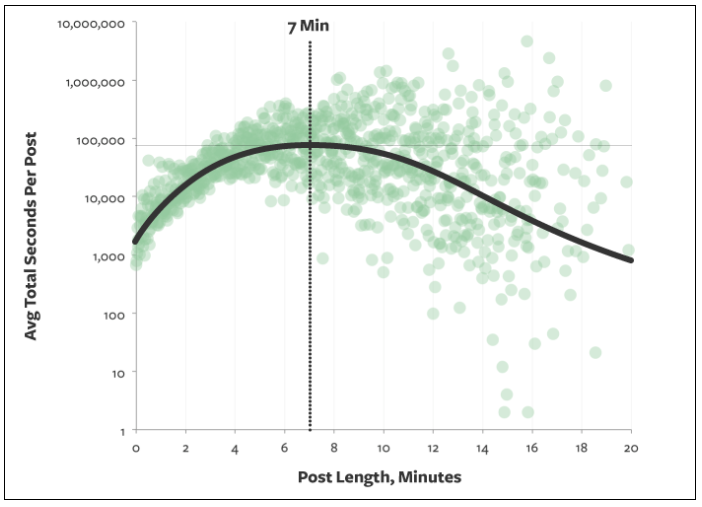
According to a recent study, people only read 20% of your content on a page.
Let that sink in for a moment. Research shows that the optimal blog post will take someone about seven minutes to read.
Typically, seven minutes translates to about 1,600 words, assuming that each word is read (which we already know isn’t the case).
So if your blog post is 1,600 words and only 20% of it gets read, that means visitors are only digesting about 320 words of your content.
What does this information tell you? Simply put, people are scanning your blogs.
So that means that your writing style needs to be adjusted accordingly if you want to increase engagement. Get rid of lengthy paragraphs and large blocks of text. That’s difficult for people to scan.
Instead, use short sentences and stick to paragraphs that are just a few lines long at most.
Add visuals to break up the content.
Visual elements jump off the page at a reader. So if someone is scanning through your blog post, they’ll likely stop at the images. They’ll skim the first few lines before and after the picture to digest your points of emphasis.
You’ve got to be consistent and establish a pattern with your visuals.
For example, let’s say you’ve got a blog post that’s 3,000 words long. You’ve got an image every 300 words or so for the first 1,000 words of the post.
But then you don’t include any more images until the final few paragraphs. That’s a mistake. Refer back to what we just discussed about how people scan.
They’re going to stop at your images. So if they get into a rhythm of scrolling until they see a picture, they’re going to scroll through the majority of your content without stopping if you have such a large gap between each visual element.
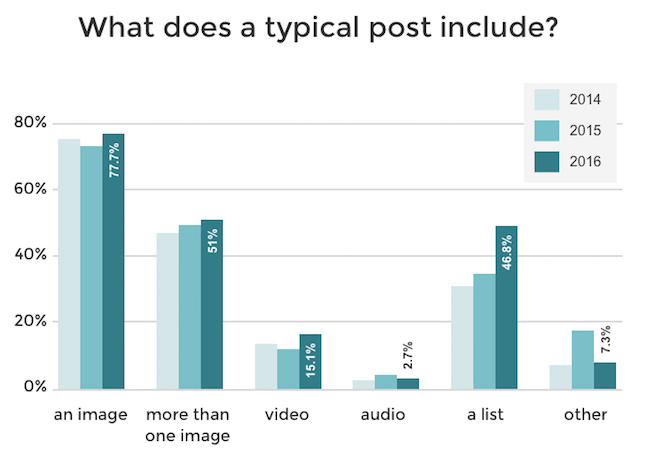
As you can see, the majority of blogs include an image. But that percentage drops down significantly in terms of blog posts with more than one image.
So you can really separate yourself from the crowd by adding lots of visuals to your blog. As you continue reading through this guide, I’ll explain which types of visual content create the most engagement.
Create infographics
As you can see from the images I’ve used so far in this blog post, graphs are a great way to help emphasize a point. There are a few reasons for this.
For starters, it helps validate the message that you’re trying to convey. Graphs also help make your blog posts more legitimate.
This shows your audience that you’re not just making up facts out of thin air. You’ve done the research and used data from high-quality sources of information.
But another reason why you should use graphs is because it helps people retain information. Studies suggest that people only remember 10% of information three days after they hear it.
However, if there is an image associated with that information, three days later people were able to retain 65% of the information.
You want people to remember what you’re telling them. This will definitely boost your engagement.
Instead of just using graphs and statistical data from sources on the web, you can create original infographics for your blog posts.
Try using free online resources, such as Canva, to design your infographics.
Their platform is very simple and easy to use. You don’t need to have any design skills to get this accomplished.
Infographics are great if your blog posts are focusing on some kind of research that you conducted. The best part about customizing original infographics is that it can ultimately drive more traffic to your website.
Think back to what I talked about earlier in terms of sourcing quality research from the Internet. Well, you’re not the only person that’s trying to do this.
Other bloggers also want to add high-quality resources and visual elements to back up their statements. When they are researching a particular topic, they might find your infographics.
Then they’ll cite your website as the source whenever they use your infographics in their content.
Those reference links will drive more traffic to your website. Plus, having more inbound links also helps improve your SEO ranking.
Use original photos
You want your content to be unique as possible. Obviously, this isn’t something that’s always 100% possible in today’s digital era. Chances are, someone else has blogged about a similar topic.
If you’re using a chart or infographic that you didn’t create on your own, then other bloggers have used it too. That’s OK.
However, if you want to be creative, you can add original photographs to your content as well. This will help separate your blog from your competition too.
Original content is like a breath of fresh air. Readers will feel the same way. If you’re into photography, you can pair that skill with your blogging platform.
These blog posts are written for people who want to explore California. The author talks about her personal experiences in different areas and adds original photos as well.
Sure, you could just browse through Google images for professional photos of different places. But that’s not as genuine as taking the pictures yourself.
Again, this also relates to validation. It’s authentic. Your audience will know that you’ve actually done something and you’re not talking about a topic that you haven’t experienced.
For the same reason as your infographics, these original photos can also end up driving more traffic to your website. If other people use them, you’ll get credit as the reference link.
But what if you don’t have a fancy camera and don’t have any photography experience?
I’m sure your smartphone has a decent camera. Then you’ll just need to educate yourself on some basic photography principles and you’re good to go.
So get out there and start snapping some photos. This will help you get more engagement on your blog.
Mark up screenshots
Another way to help improve engagement on your blog posts is by showing people how to do something. Think about how people are searching for topics on the Internet.
If your blogs include “how to” guides or things of that nature, you’ll definitely want to include visual elements to show people what you’re talking about.
It’s not easy to explain how to do something. But taking screenshots on your computer and marking them up with arrows, boxes, circles, or words can really guide your readers in the right direction.
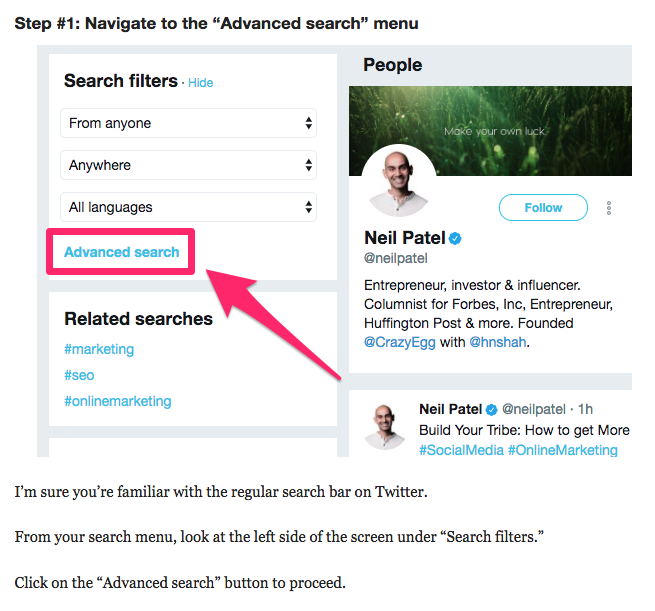
In this section of the post, I’m explaining how people can use the Twitter advanced search query as a tool to generate leads.
Rather than just saying, “Click on the advanced search button,” I show my audience exactly where the button is located.
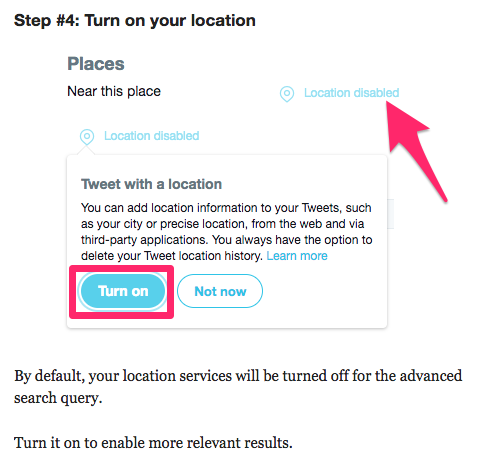
I continue to use some short text to explain where the button is on the page as well. Here’s another example from that same blog post.
I’m using the same approach for this step as well. Instead of just saying, “Turn on your location,” I markup the screenshot, so it’s obvious what needs to be done.
By default, I’m sure your computer has some screenshot editing software.
Personally, I like to use Skitch to markup my content. It’s free to download and use, so give it a try if you’re looking for something new.
Add videos
For the most part, we’ve been talking about different types of pictures as visual elements to enhance your blogs. But that’s not the only type of visuals that can be used.
You can add videos to your blog posts as well.
Take a look at your analytics to see how long website visitors are staying on a page before leaving. If you want to improve that time, videos can be the solution.
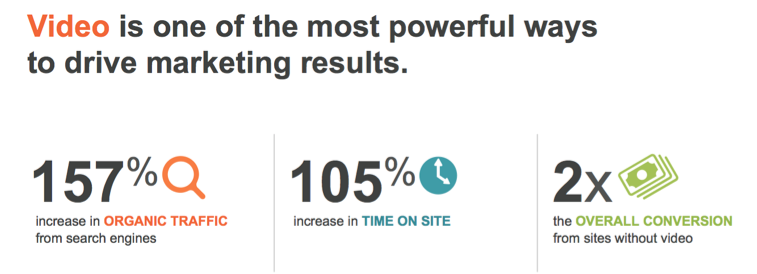
In fact, research shows that videos can increase the time spent on your page by more than 100%.
The great thing about adding videos to your blog is that it’s really easy to do. You won’t necessarily have to create new video content for this.
Instead, just repurpose some of your old videos.
Here’s what I mean. Hopefully, you have a YouTube channel. I’m sure you’ve got lots of informative video content on this platform.
So anytime you’re discussing something in a blog post that’s relevant to one of your videos, just embed the YouTube link within the blog.
That’s it. This doesn’t require any extra effort on your part.
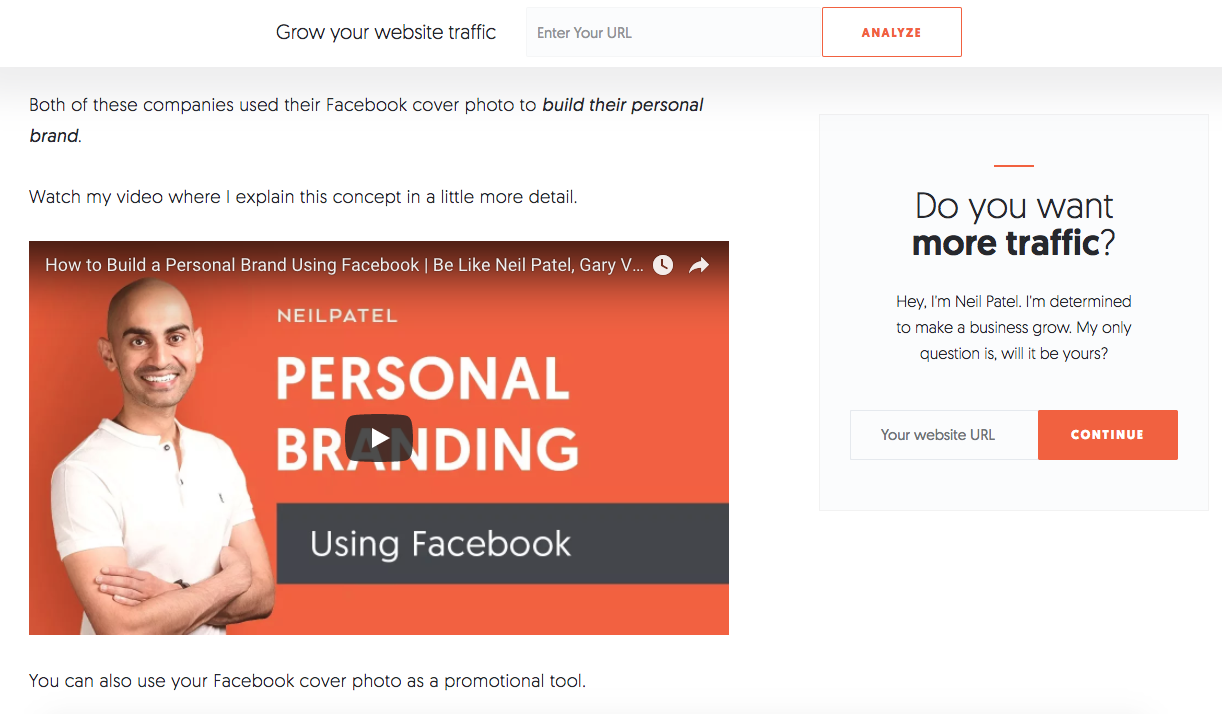
Plus, videos also help break up your content the same way your images do. Here’s an example from a blog post I wrote about Facebook cover photos.
As you can see, I embedded a link from my YouTube channel that was relevant to the topic.
Here’s another quick tip about how to use videos in your blog.
Add captions. Captions increase views by 40%. Furthermore, there is an 80% increase that viewers will watch an entire video if captions are available.
Conclusion
If you want to increase engagement on your blog posts, start by adding more visual elements to the page.
It’s important for you to understand how your audience is consuming your content. They aren’t reading each word on the page. Instead, they’re skimming through it.
Visuals give your readers a chance to stop and digest your points.
Mix it up. There are plenty of different types of visuals that you can use in the same post to drive engagement.
Add graphs, charts, and custom infographics. Take original photographs. Markup screenshots. Include relevant videos.
All of these will help bring your blog to the next level.
What types of visual elements are you using to increase engagement on your blog posts?
I’ve always been a true believer that having the right tools available can definitely make your blogging easier. The Internet has grown so much, we can now promote and increase brand awareness quickly within a few days. Imagine sharing content on your social media account with 50,000 people? That’s enormous traffic directed to your blog within a few minutes, leading to a higher chance of conversions. Anyway, with that said, I’ve always believed the success of a blog starts with a great blogging interface. We have several blogging platforms available to us but it’s important you are clear about what’s important so you can make a decisive choice. Let’s look at the important things to look for when choosing the right blogging platform.
This will be Part 1 of 2.
Let’s get started…
The Backend Interface
I think one of the MOST important things when choosing a blogging platform is the backend because it needs to be easy to use. This part of the platform controls the posting, setup, customization, and other important elements to establish a successful blog. You need to be able to find things easily while knowing what each menu will do for your blog. From the top of my head, I know what’s important to me, like:
Publishing posts
Moderating comments
Theme customizations
Meta settings
However, you can only tweak them when you know where they are located in the backend. When choosing your blogging platform, pay close attention to the important factors and how easily they are accessible.
Templates
I use to be able to code very well and be able to design my blog from scratch, but I no longer have that knowledge like I did so it’s important I have theme flexibility. What do I mean? I want to be able to go into the backend and install the type of template I need with the click of a button. This way, installation is quick and I get EXACTLY what I am looking for. Another important thing is to be able to easily customize the theme so look for where the platform keeps the .CSS and other files while checking how easily they can be customized.
Here are a few things to pay close attention to when choosing a platform for the sole purpose of web design. Does the platform offer a great selection of:
Themes
Mobile-friendly themes
Accessible files for tweaking
Themes with a simple drag and drop interface
All of these will make it very easy for you to go live with your blog quickly so you can focus on content and marketing.
SEO Information
We all know the importance of SEO and how it can help grow your blog. Google uses meta tags to identify what your website is all about so it’s important that these options are available in your platform backend. It’s important you first know what’s important when it comes to SEO and if you don’t, consider the following:
Page title
Page description
Keywords
“Target” keywords in content
xml
txt
Having easy access to these factors will allow you to optimize your website quickly for search engines. Organic traffic can be a great source of FREE relevant traffic perfect for brand awareness and conversions.
Wrapping It Up…
This is the end of Part 1 and in Part 2, we’ll be looking at another 3-4 important factors when choosing a blogging platform. All of the factors listed above are important to streamline your blogging and business growth. The way I look at it is the less time you spend on customization, the more time you can focus on writing high value content, testing, and tweaking. In the next part, I’ll also discuss what blogging platforms I recommend if you’re just getting started to streamline your entire blogging mission.
Please provide feedback and let me know if you have any questions.
Opinions expressed by Entrepreneur contributors are their own.
It was only a matter of time for Harvey Weinsten. Once media reports began swirling around allegations of sexual harassment and abuse against this big-name movie mogul, the company he co-founded seemed destined for bankruptcy.
After the New York Times ran its tell-all piece in October, The Weinstein Company lost TV deals and, on its own, canceled film releases, fell behind on bills, fired more than a third of its workforce and was hit with lawsuits from creditors over unpaid debts, according to Variety.
A few outside parties considered throwing the company a financial lifeline, according to the Times, but The Weinstein Company's future and image increasingly moved to a point beyond repair.
An acquisition deal fell apart just last month, in early March. What made the company's financial troubles worse was that Weinstein was widely acknowledged to be its creative mastermind. He obviously had to leave, but his departure raised questions about whether The Weinstein Company could survive without him.
Weinstein was not the first founder to leave his company reeling, and he certainly won't be the last. But the flawed logic that accompanies an event of this kind is our assumption that someone who starts a company is indispensable to its success. That's just not so: Founders may be essential in the early days, but their creations are not doomed to fail without them at the helm. Here is what we've learned up to now:
Founders shouldn't be lifers.
The popular notion that founders are indispensable to their startups is backward. The business comes first; the leader comes second.
The founder is the person (or team) who answers the tough early questions. Founders imagine the company's future, decide which customers to target and create a value proposition for those customers. Strong leaders occasionally create advantageous cultures or personal brands, but those are rare cases.
When people envision entrepreneurs, their thoughts often drift to visionaries who started, grew and led their businesses for a long time. Bill Gates and Ingvar Kamprad accomplished this, respectively, with Microsoft and IKEA, but they are the exceptions rather than the rule.
More often, entrepreneurs help their companies find a niche, then become a burden as the business attempts to exploit that niche. Established companies no longer require the sort of ground-breaking trial and error actions and the radical shifts that founders do so well.
Rather, these businesses need quality assurance, cost-cutting and effectiveness. That managerial skill set is vastly different from the one that most disruptive founders possess.
Consider how Walt Disney's death in 1966 affected his company. At first, the organization achieved subpar results by attempting to emulate its deceased founder's vision. When Michael Eisner became CEO in 1984, he changed everything by transforming the company into a media conglomerate.
Eisner was not Disney, nor did he try to be. Instead, he followed a new strategy to manage and grow the organization -- one that would have been impossible had the company not deviated from the business practices of its namesake.
None of this should indicate that moving on after a founder's departure is easy. Some companies rely on the sales contacts of their founders to make money. And then there are the companies whose founders are their owners -- a connection which can make it more difficult to remove them if they don't want to go. (Consider the ugly divorce between Steve Jobs and Apple.)
Yet, while such a parting of the ways might seem like an impossible task, even companies closely tied to their creators can flourish after those founders leave.
There are strategies for recovering from an entrepreneur's exit.
Leaders of firms whose founders leave must take steps to minimize the damage and capitalize on the chance to change. They can accomplish this transition by keeping three suggestions in mind:
1. Focus on value. The founder was the leader -- not the product or service. Focus on what the company does well that customers appreciate. Forget about the old vision for a moment, and get back to basics by ensuring the company continues to offer value.
Despite seemingly endless troubles at the top of Uber, that ride-hailing company still boosted its sales by 61 percent last quarter, according to Bloomberg. Regardless of negative actions committed at the top of the company's food chain, people still want to use their smartphones to summon an Uber ride.
The lesson? The members of any company's C-suite will change over time, but success can continue as long as the product continues to meet a need (and does it well).
2. Rewrite your brand story. The product might not be affected by the founder's exit, but many startups rely on their creators' stories to guide their brands. If the founder's story was the company's story, it's time to write a new one -- a story that places the business and its achievements ahead of a single personality.
Sometimes, that means pivoting to focus on something that does not remind people of the old regime. Zenefits, an insurance-broker startup, initially sold policies to customers. After its co-founder and CEO resigned during a scandal about licensing, the new leadership repositioned the operation to focus on software instead of policies.
The lesson? A pivot in the brand's focus won't excuse a founder's mistakes, but it could save the business by distancing its operations from its past sins.
3. Launch in a new direction. The exit of a founder is a grueling event. In small operations, the departure of the first employee can make those who remain -- and the company's customers -- feel directionless. So, prevent this confusion from taking hold by hosting a launch party for the company's new direction. Even if the launch party is more of an internal meeting and a press release, the definitive step in a new direction provides clarity for everyone.
Remember when Groupon ousted its founder in 2013? Instead of floundering after his departure, the company launched Groupon+ to let customers link deals directly to their credit cards. This shift toward a more fluid experience flew in the face of the company's traditional strategies but provided Groupon with the boost it needed to power through its founder's departure.
The lesson? Overall, launches are happy events. While a huge celebration in the wake of turmoil might seem absurd, a new direction tells people that this company is starting fresh. That doesn't mean the business should turn its back on existing customers, though; it should take care to invite those customers to share in the next stage of the business.
Moreover, the company should consider new names, new designs and anything else that shows the world it is making major changes.
Certainly, founders are pivotal people at startups. As their companies grow, however, their importance to the enterprise dwindles. Some entrepreneurs see their companies through for decades; others don't. Regardless of who is in charge, follow these tips to ensure that your founder's exit -- should that event occur -- doesn't take the company along with it.